Wrap-up
Overview
Teaching: 0 min
Exercises: 0 minQuestions
How do all pieces of a Jekyll website fit into a directory structure?
What other resources are available for learning more on Jekyll?
Objectives
Summarise all the different technologies that are coming together to create GitHub Pages websites.
Look at the anatomy of a Jekyll website repository.
Identify other resources and further reading about Jekyll.
If you are a learner or an instructor that has some time left in their workshop - at this point we strongly recommend visiting the Jekyll Themes episode in Extras section of the lesson. It builds on the knowledge we gained so far and expands on how to build more complex and professional-looking websites by reusing existing website themes. Here, we are going to recap what we have learned so far and look at the anatomy of a GitHub Pages website and its common building blocks, which will also help you better understand Jekyll themes once you get to learning about them.
Summary
Throughout this lesson, we learned how to create formatted webpage content with Markdown, configure a GitHub repository to use the Jekyll static site generator, and how to use Jekyll to build our Markdown pages and various other files (HTML snippets, CSS, images, etc.) into a set of HTML documents that are then served via the GitHub Pages framework.
HTML is the basic building block of webpages served on the Internet. It describes the structural elements of the page and their raw content and is often aided by CSS - an ordered set of styling instructions telling the browser how the content described in the HTML document should be organised and formatted. HTML is very verbose and difficult to write by hand - beyond their initial design HTML pages are meant to be processed by machines. For that reason, Markdown was introduced - a lightweight Markup language and a convention for adding style information to textual content while retaining the human-readable form. It is not as rich in syntax as HTML, but comparably more usable by a wider audience.
Jekyll is a powerful static site generator behind GitHub Pages that supports a high degree of reuse and separation of content and presentation. It can be configured via the
_config.ymlYAML file that stores site-wide variables accessible from anywhere within our site. It also allows us to define and reuse page-wide variables, by defining them as the front matter at the beginning of our Markdown pages. Used in conjunction with Liquid, its scripting language, Jekyll allows us to include content from reusable markup snippets that can be repeated on multiple pages and to embed code snippets and filters into our pages to create some complex content assembly pipelines. That way, adding a new blog post to your website may only involve creating a file in the_postsfolder of your website, setting it to use the ‘post’ template and focusing on its content - and it will magically appear at the top of your Blog timeline without any extra effort on your part.
As a last thing, let’s put it all together by having a look at a directory structure of a Jekyll website, where different pieces are located and see how they relate to visual components on the rendered website pages.
Jekyll Website Directory Structure
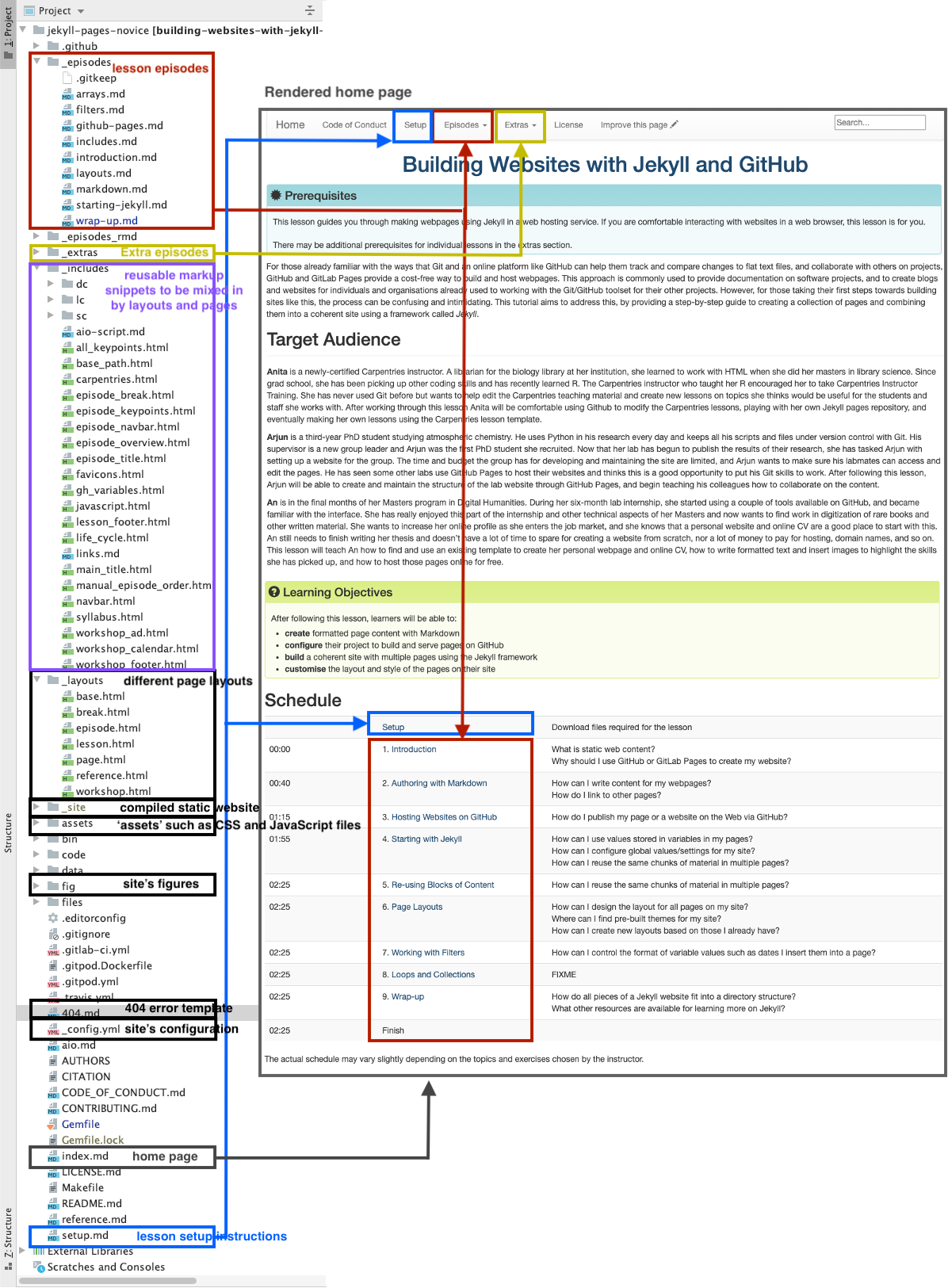
As an example, we will have a look the Jekyll configuration used to create this lesson (shown in the image below). It uses The Carpentries Jekyll theme, which contains page layouts for various Carpentry websites - lesson materials, workshop websites, etc. We have created a new repository for this lesson by copying the Carpentries theme repository and customised it by adding our episodes and other content.
Note that if you look at other Jekyll websites, they will have slightly different directory structures as
they may use different themes. However, there are some common elements, such as index.md (the home page),
_config.yml (website’s global configuration),
and folders starting with _ which have special meaning to Jekyll by convention, such as:
_includes- containing reusable page snippets,_layouts- for storing theme’s page templates,_sassorassets(without the leading_) where Jekyll looks for ‘assets’ such as CSS and JavaScript files,_data- for storing well-formatted site data (in either the .yml, .yaml, .json, .csv or .tsv formats) that Jekyll autoloads and makes accessible accessible via thesite.dataglobal variable,_site- containing the static version of the website ready to be served to users once Jekyll compiles it.
Other ‘special’ folders, particular to this example only, are _episodes and _extras - they are collections defined by the theme
designer and have a special role in this website/theme for storing lesson and extra episodes.
Unless these collections are configured as described in the previous episode,
they will not be automatically processed by Jekyll despite starting with the _. The theme designer has made sure they are embedded in the website as intended,
by defining them in _config.yml and referring to them in Liquid code snippets
throughout the site.
In the website example we have been building throughout this lesson,
we have seen a similar folder _posts where we stored content of blog posts.
Other commonly seen folders in Jekyll websites are fig, sometimes also named images or figures, for storing website images and figures. There is no firm naming convention in this case - Jekyll will not process
these folders automatically and the website designer will have to make sure to access/link to the content
of these folders appropriately.
Reusing The Carpentries Jekyll Lesson Theme
Reusing the lesson template to create a new lesson can be achieved by copying the theme repository and customising it by adding your episodes in the appropriate place. The template is published under the Creative Commons Attribution 4.0 license, which means you are free to re-use and modify it however you like as long as you acknowledge the original source. You will often find that other Jekyll themes are available with a similarly permissive license, but you should always check the terms to make sure you understand what you can and cannot do with your chosen theme.
Further Resources
Below are some recommended resources to help you continue learning about Jekyll websites:
- W3C Schools HTML tutorial
- W3C Schools CSS tutorial
- Github-flavored Markdown info page
- Getting started with GitHub Pages from GitHub Docs
- JekyllRB - the ultimate source of Jekyll resources
- Jekyll guides
- Jekyll themes
Key Points
Jekyll is a powerful static site generator behind GitHub Pages that supports a high degree of reuse and separation of content and presentation.
Learning more on Jekyll themes will enable you to create complex and professional-looking websites.